Get IRS 4506-T Form
Embarking on a journey through the financial landscape involves various stops, one of which includes the often-encountered IRS 4506-T form, a pivotal tool for both individuals and businesses seeking to solidify their financial credibility. This form, though seemingly mundane at first glance, serves as a key to unlocking detailed tax return information that can prove invaluable in numerous scenarios, including but not limited to, loan applications, mortgage refinancing, and obtaining student or small business loans. The versatility of the IRS 4506-T form lies in its capacity to provide a comprehensive view of past tax returns, offering a clear and accurate representation of an entity's income history. As such, the mastery of this form's intricacies cannot be underestimated, as it not only facilitates smoother transactions with lenders and educational institutions but also ensures compliance with various regulatory frameworks governing financial and tax-related disclosures. Engaging with the IRS 4506-T form, therefore, is not merely a bureaucratic necessity but a strategic step towards achieving financial goals and ensuring transparency in one’s financial affairs.
IRS 4506-T Example
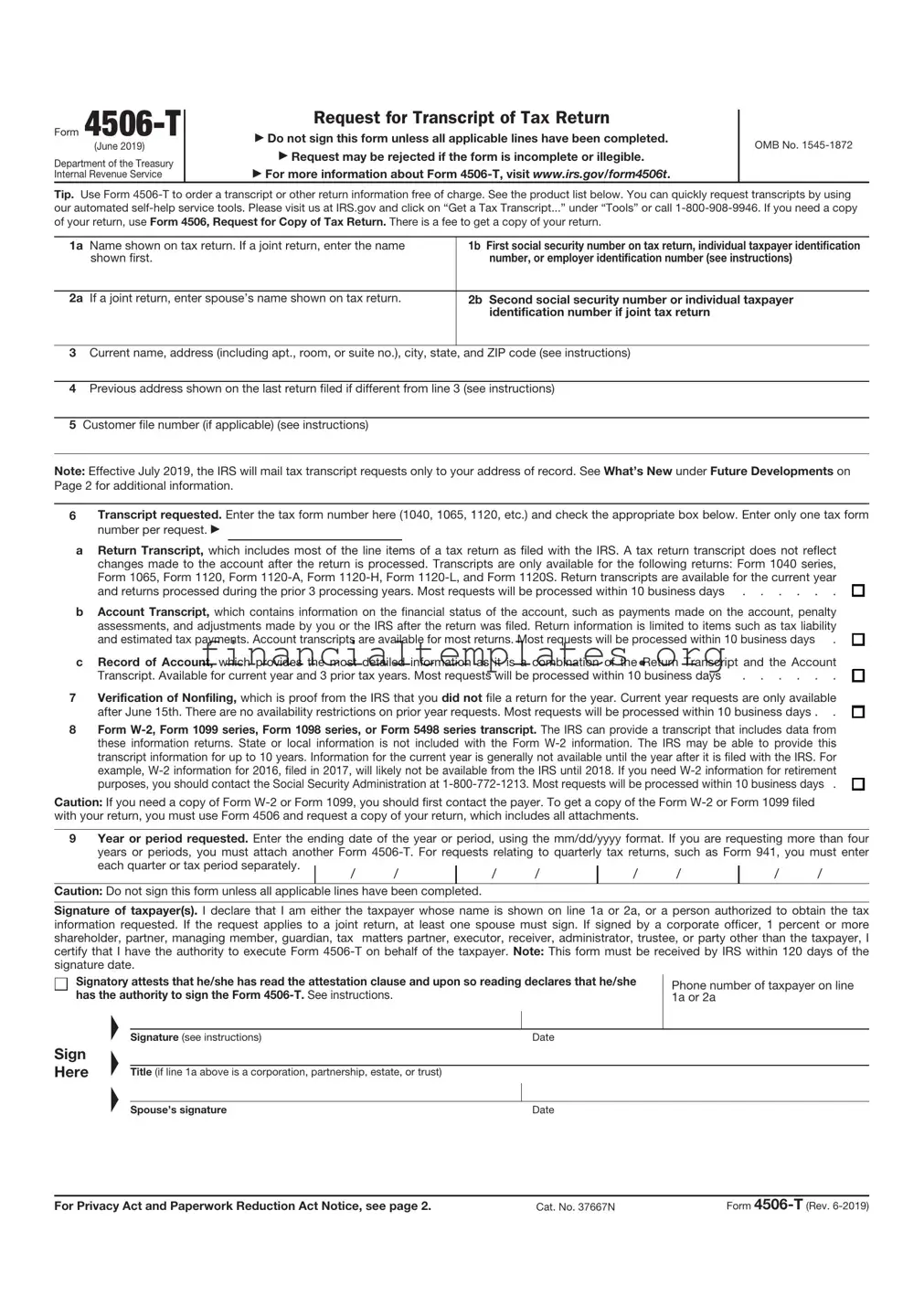
Form |
|
Request for Transcript of Tax Return |
|
|
|
||
|
▶ Do not sign this form unless all applicable lines have been completed. |
OMB No. |
|
(June 2023) |
|
▶ Request may be rejected if the form is incomplete or illegible. |
|
Department of the Treasury |
|
|
|
|
▶ For more information about Form |
|
|
Internal Revenue Service |
|
|
Tip: Get faster service: Online at www.irs.gov, Get Your Tax Record (Get Transcript) or by calling
have teams available to assist. Note: Taxpayers may register to use Get Transcript to view, print, or download the following transcript types: Tax Return Transcript (shows most line items including Adjusted Gross Income (AGI) from your original Form
1a |
Name shown on tax return. If a joint return, enter the name |
1b First social security number on tax return, individual taxpayer identification |
|
shown first. |
number, or employer identification number (see instructions) |
|
|
|
2a |
If a joint return, enter spouse’s name shown on tax return. |
2b Second social security number or individual taxpayer |
|
|
identification number if joint tax return |
3Current name, address (including apt., room, or suite no.), city, state, and ZIP code (see instructions)
4Previous address shown on the last return filed if different from line 3 (see instructions)
5Customer file number (if applicable) (see instructions)
Note: Effective July 2019, the IRS will mail tax transcript requests only to your address of record. See What’s New under Future Developments on Page 2 for additional information.
6Transcript requested. Enter the tax form number here (1040, 1065, 1120, etc.) and check the appropriate box below. Enter only one tax form number per request. ▶
aReturn Transcript, which includes most of the line items of a tax return as filed with the IRS. A tax return transcript does not reflect changes made to the account after the return is processed. Transcripts are only available for the following returns: Form 1040 series, Form 1065, Form 1120, Form
and returns processed during the prior 3 processing years. Most requests will be processed within 10 business days . . . . . .
bAccount Transcript, which contains information on the financial status of the account, such as payments made on the account, penalty assessments, and adjustments made by you or the IRS after the return was filed. Return information is limited to items such as tax liability
and estimated tax payments. Account transcripts are available for most returns. Most requests will be processed within 10 business days .
cRecord of Account, which provides the most detailed information as it is a combination of the Return Transcript and the Account
Transcript. Available for current year and 3 prior tax years. Most requests will be processed within 10 business days |
. . . . . . |
7Verification of Nonfiling, which is proof from the IRS that you did not file a return for the year. Current year requests are only available
after June 15th. There are no availability restrictions on prior year requests. Most requests will be processed within 10 business days . .
8Form
purposes, you should contact the Social Security Administration at
Caution: If you need a copy of Form
9Year or period requested. Enter the end date of the tax year or period requested in mm/dd/yyyy format. This may be a calendar year, fiscal year or quarter. Enter each quarter requested for quarterly returns. Example: Enter 12/31/2018 for a calendar year 2018 Form 1040 transcript.
/ |
/ |
/ |
/ |
/ |
/ |
/ |
/ |
Caution: Do not sign this form unless all applicable lines have been completed.
Signature of taxpayer(s). I declare that I am either the taxpayer whose name is shown on line 1a or 2a, or a person authorized to obtain the tax information requested. If the request applies to a joint return, at least one spouse must sign. If signed by a corporate officer, 1 percent or more shareholder, partner, managing member, guardian, tax matters partner, executor, receiver, administrator, trustee, or party other than the taxpayer, I certify that I have the authority to execute Form
Signatory attests that he/she has read the attestation clause and upon so reading declares that he/she |
Phone number of taxpayer on line |
|||
has the authority to sign the Form |
|
|||
|
1a or 2a |
|||
|
▲ |
|
|
|
|
|
|
|
|
|
Signature (see instructions) |
Date |
|
|
Sign |
▲ |
|
|
|
Here |
|
|
|
|
Title (if line 1a above is a corporation, partnership, estate, or trust) |
|
|
||
|
▲ |
|
|
|
|
|
|
|
|
|
Spouse’s signature |
Date |
|
|
|
|
|
||
For Privacy Act and Paperwork Reduction Act Notice, see page 2. |
Cat. No. 37667N |
Form |
||

Form |
Page 2 |
Section references are to the Internal Revenue Code unless otherwise noted.
Future Developments
For the latest information about Form
Individuals. Transcripts of jointly filed tax returns may be furnished to either spouse. Only one signature is required. Sign Form
Corporations. Generally, Form
(1) an officer having legal authority to bind the corporation, (2) |
any person designated by the board of directors or other |
governing body, or (3) any officer or employee on written |
Chart for individual transcripts (Form 1040 series and Form
If you filed an
individual return and Mail or fax to: lived in:
The filing location for the Form
What’s New. As part of its ongoing efforts to protect taxpayer data, the Internal Revenue Service announced that in July 2019, it will stop all
If a
request by any principal officer and attested to by the |
secretary or other officer. A bona fide shareholder of record |
owning 1 percent or more of the outstanding stock of the |
corporation may submit a Form |
documentation to support the requester's right to receive the |
information. |
Partnerships. Generally, Form
All others. See section 6103(e) if the taxpayer has died, is insolvent, is a dissolved corporation, or if a trustee, guardian, executor, receiver, or administrator is acting for the taxpayer.
Note: If you are Heir at law, Next of kin, or Beneficiary you
Alabama, Arkansas, Florida, Georgia, Louisiana, Mississippi, North Carolina, Oklahoma, South Carolina, Tennessee, Texas, a foreign country, American Samoa, Puerto Rico, Guam, the Commonwealth of the Northern Mariana Islands, the U.S. Virgin Islands, or A.P.O. or F.P.O. address
Internal Revenue Service
RAIVS Team
Stop 6716 AUSC
Austin, TX 73301
General Instructions
Caution: Do not sign this form unless all applicable lines have been completed.
Purpose of form. Use Form
Note: If you are unsure of which type of transcript you need, request the Record of Account, as it provides the most detailed information.
Customer File Number. The transcripts provided by the IRS have been modified to protect taxpayers' privacy. Transcripts only display partial personal information, such as the last four digits of the taxpayer's Social Security Number. Full financial and tax information, such as wages and taxable income, are shown on the transcript.
An optional Customer File Number field is available to use when requesting a transcript. This number will print on the transcript. See Line 5 instructions for specific requirements. The customer file number is an optional field and not required.
Tip. Use Form 4506, Request for Copy of Tax Return, to request copies of tax returns.
Automated transcript request. You can quickly request transcripts by using our automated
Where to file. Mail or fax Form
If you are requesting more than one transcript or other product and the chart shows two different addresses, send your request to the address based on the address of your most recent return.
Line 1b. Enter your employer identification number (EIN) if your request relates to a business return. Otherwise, enter the first social security number (SSN) or your individual taxpayer identification number (ITIN) shown on the return. For example, if you are requesting Form 1040 that includes Schedule C (Form 1040), enter your SSN.
Line 3. Enter your current address. If you use a P.O. box, include it on this line.
Line 4. Enter the address shown on the last return filed if different from the address entered on line 3.
Note: If the addresses on lines 3 and 4 are different and you have not changed your address with the IRS, file Form 8822, Change of Address. For a business address, file Form 8822- B, Change of Address or Responsible Party — Business.
Line 5. Enter up to 10 numeric characters to create a unique customer file number that will appear on the transcript. The customer file number should not contain an SSN. Completion of this line is not required.
Note. If you use an SSN, name or combination of both, we will not input the information and the customer file number will reflect a generic entry of “9999999999” on the transcript.
Line 6. Enter only one tax form number per request.
Signature and date. Form
▲ |
You must check the box in the signature area |
|
! |
||
to acknowledge you have the authority to sign |
||
and request the information. The form will not |
||
be processed and returned to you if the |
||
CAUTION |
box is unchecked. |
must be able to establish a material interest in the estate or trust.
Documentation. For entities other than individuals, you must attach the authorization document. For example, this could be the letter from the principal officer authorizing an employee of the corporation or the letters testamentary authorizing an individual to act for an estate.
Signature by a representative. A representative can sign Form
Privacy Act and Paperwork Reduction Act Notice. We ask for the information on this form to establish your right to gain access to the requested tax information under the Internal Revenue Code. We need this information to properly identify the tax information and respond to your request. You are not required to request any transcript; if you do request a transcript, sections 6103 and 6109 and their regulations require you to provide this information, including your SSN or EIN. If you do not provide this information, we may not be able to process your request. Providing false or fraudulent information may subject you to penalties.
Routine uses of this information include giving it to the Department of Justice for civil and criminal litigation, and cities, states, the District of Columbia, and U.S. commonwealths and possessions for use in administering their tax laws. We may also disclose this information to other countries under a tax treaty, to federal and state agencies to enforce federal nontax criminal laws, or to federal law enforcement and intelligence agencies to combat terrorism.
You are not required to provide the information requested on a form that is subject to the Paperwork Reduction Act unless the form displays a valid OMB control number. Books or records relating to a form or its instructions must be retained as long as their contents may become material in the administration of any Internal Revenue law. Generally, tax returns and return information are confidential, as required by section 6103.
The time needed to complete and file Form
If you have comments concerning the accuracy of these time estimates or suggestions for making Form
Internal Revenue Service
Tax Forms and Publications Division
1111 Constitution Ave. NW,
Do not send the form to this address. Instead, see Where to file on this page.
Delaware, Illinois, Indiana, |
Internal Revenue Service |
Iowa, Kentucky, Maine, |
RAIVS Team |
Massachusetts, Minnesota, |
Stop 6705 |
Missouri, New Hampshire, |
Kansas City, MO 64999 |
New Jersey, New York, |
|
Vermont, Virginia, Wisconsin |
|
|
|
Alaska, Arizona, California, |
Internal Revenue Service |
Colorado, Connecticut, District |
RAIVS Team |
of Columbia, Hawaii, Idaho, |
P.O. Box 9941 |
Kansas, Maryland, Michigan, |
Mail Stop 6734 |
Montana, Nebraska, Nevada, |
Ogden, UT 84409 |
New Mexico, North Dakota, |
|
Ohio, Oregon, Pennsylvania, |
|
Rhode Island, South Dakota, |
|
Utah, Washington, West |
|
Virginia, Wyoming |
|
Chart for all other transcripts
If you lived in |
|
or your business was |
Mail or fax to: |
in: |
|
|
|
Alabama, Alaska, Arizona, |
Internal Revenue Service |
Arkansas, California, |
RAIVS Team |
Colorado, Florida, Hawaii, |
P.O. Box 9941 |
Idaho, Iowa, Kansas, |
Mail Stop 6734 |
Louisiana, Minnesota, |
Ogden, UT 84409 |
Mississippi, Missouri, |
|
Montana, Nebraska, Nevada, |
|
New Mexico, North Dakota, |
|
Oklahoma, Oregon, South |
|
Dakota, Texas, Utah, |
|
Washington, Wyoming, a |
|
foreign country, American |
|
Samoa, Puerto Rico, Guam, |
|
the Commonwealth of the |
|
Northern Mariana Islands, |
|
the U.S. Virgin Islands, |
|
A.P.O. or F.P.O. address |
|
|
|
Connecticut, Delaware, |
Internal Revenue Service |
District of Columbia, |
RAIVS Team |
Georgia, Illinois, Indiana, |
Stop 6705 |
Kentucky, Maine, Maryland, |
Kansas City, MO 64999 |
Massachusetts, Michigan, |
|
New Hampshire, New |
|
Jersey, New York, North |
|
Carolina, Ohio, Pennsylvania, |
|
Rhode Island, South |
|
Carolina, Tennessee, |
|
Vermont, Virginia, West |
|
Virginia, Wisconsin |
|
|
|
Document Specifics
| Fact Name | Detail |
|---|---|
| Purpose | The IRS 4506-T form is used to request tax return information for income verification purposes. |
| Who Can Use It | Individuals, businesses, and third parties authorized by the taxpayer can use this form to obtain the requested tax information. |
| Types of Information Available | The form allows users to request various forms of tax return information including transcripts of tax returns, tax account information, and record of account. |
| Governing Law | The use of IRS 4506-T form is governed by federal tax law, as the Internal Revenue Service is a federal agency. |
Guide to Writing IRS 4506-T
After deciding to request a tax transcript, individuals or entities may need to fill out the IRS Form 4506-T. This document is a request for a transcript of a tax return or other tax-related information. While it may seem daunting at first, the process can be navigated smoothly with clear instructions. The steps below are designed to guide you through each part of the form to ensure accuracy and completeness in your request. Once the form has been successfully filled out and submitted, the IRS will process the request and provide the requested tax transcript, typically within 10 business days.
- Begin by entering your full name as shown on your tax return or the name of the entity requesting the tax transcript in the space provided for the 1st line.
- Fill in your Social Security Number (SSN) or Individual Taxpayer Identification Number (ITIN). If you are filling out the form for a business, enter its Employer Identification Number (EIN) in the designated space.
- Provide your current address. If you have moved since you last filed a tax return, enter the address exactly as it appears on the last return.
- On the line provided for the requester’s phone number, enter your current daytime telephone number.
- If the transcript or tax information is to be sent to a third party (like a mortgage company), fill in the third party’s name, address, and phone number in the designated section.
- Mark the box that corresponds to the type of transcript you are requesting. Be sure to read each option carefully to ensure you are selecting the appropriate type of transcript for your needs.
- Indicate the tax form number you are requesting a transcript for (for example, Form 1040, 1065, etc.) in the designated space.
- Enter the tax years or periods you are requesting transcripts for, using the format MM/DD/YYYY. You can request transcripts for up to four years or periods on a single form.
- Sign and date the form, ensuring you have read the attestation and agree to the terms. If you are requesting a joint tax transcript, both parties must sign the form.
- Review your form for accuracy and completeness before mailing it to the appropriate IRS address. You can find this address on the IRS website or by consulting the instructions for Form 4506-T.
By following these steps carefully, you can fill out the IRS Form 4506-T accurately and submit your request for a tax transcript without unnecessary delays. Remember, the accuracy of your information is crucial for the timely processing of your request. If additional information or clarification is needed, the IRS will contact you using the information provided on the form.
Understanding IRS 4506-T
-
What is the IRS 4506-T form used for?
The IRS 4506-T form is used to request tax transcripts. These transcripts can be used to verify past income and tax filing status for mortgage applications, student or small business loan applications, and other situations requiring official IRS documentation. It is an essential form for individuals and businesses needing to prove their financial standing without providing actual tax returns.
-
How can I obtain the IRS 4506-T form?
The form can be downloaded directly from the official IRS website. It is also available at IRS offices or through tax professionals who may assist in filling out and submitting the form on your behalf.
-
Is there a fee to request a transcript using form 4506-T?
No, the IRS does not charge a fee for transcript requests made through form 4506-T. This makes it a cost-effective way for individuals and businesses to access their tax information when needed.
-
What types of transcripts can I request with form 4506-T?
Several types of transcripts can be requested with this form, including:
- Tax Return Transcript - shows most line items from your original tax return.
- Tax Account Transcript - shows basic data such as return type, marital status, adjusted gross income, taxable income, and all payment types.
- Record of Account Transcript - combines the information from both the Tax Return and Tax Account Transcripts.
- Wage and Income Transcript - shows data from information returns, such as W-2s, 1099s, and 1098s.
- Verification of Non-filing Letter - provides proof that the IRS has no record of a filed Form 1040 for a particular year.
-
How do I submit form 4506-T?
The completed form can be mailed or faxed to the IRS. The address and fax number to send your request can be found on the last page of the form or on the IRS website. Ensure all fields are completed accurately to avoid any processing delays.
-
How long does it take to process a request?
Processing times may vary, but requests are typically processed within 10 business days after the IRS receives and processes the form. During peak times, such as tax season, processing can take longer.
-
Can I request a transcript for years not listed on the form?
Yes, you can request transcripts for years not explicitly listed on the form. You can manually enter the years needed in the designated section of the form, but keep in mind that the IRS generally only keeps transcripts for the past three years available.
-
What should I do if my request is rejected?
If your request is rejected, review the rejection notice for specific reasons. Common issues include mismatches in personal information or missing signatures. Correct any errors and resubmit the form. If issues persist, contact the IRS directly for further assistance.
-
Is there a way to expedite my transcript request?
While the IRS does not offer an official expedited service for 4506-T requests, ensuring that your form is accurately completed and promptly submitted may help reduce wait times. For immediate needs, using the IRS's online portal to view and print transcripts might be a faster option for individuals.
Common mistakes
When dealing with the IRS 4506-T form, which is used to request tax return information, people often stumble upon a few common mistakes. Recognizing and avoiding these mistakes can streamline the process, making it smoother for everyone involved. Here's a closer look:
-
Incorrect tax form numbers: Sometimes, individuals mistakenly fill in the wrong tax form number they're requesting information for. It's crucial to double-check that the form number matches the specific tax information needed.
-
Not specifying the year: It's common to forget to specify the year of the tax return you're interested in. Without this, the IRS won't know which year's information to provide, leading to delays or incorrect information.
-
Unmatching names and Social Security numbers: The name and Social Security number on the 4506-T must match those on file with the IRS. Discrepancies here are a major red flag and will cause issues in processing the request.
-
Omitting the signature: An easy mistake is forgetting to sign the form. A signature is mandatory for processing, as it validates your consent and authorization to obtain the tax records.
-
Not including all necessary pages: If the form submission requires additional pages or documents, leaving these out can stall the process. Ensure everything required is included in your submission packet.
-
Using outdated forms: The IRS periodically updates its forms. Using an older version of the 4506-T might mean missing out on new fields or updated instructions, leading to a faulty submission.
-
Incorrect address or fax number: Sending the completed form to the wrong address or fax number can significantly delay processing. Always double-check the latest submission instructions provided by the IRS.
-
Failing to check the box for the correct type of transcript: It's easy to overlook the various boxes indicating the type of transcript needed (e.g., tax return, tax account). This choice determines the kind of information the IRS will provide, so choose carefully.
Avoiding these common mistakes can help ensure that your request through the IRS 4506-T form is processed efficiently and accurately. Approach the form with care, double-check your information, and make sure you're using the most current version. A little attention to detail goes a long way in smoothing out this process.
Documents used along the form
When individuals or businesses need to request tax transcripts, they often turn to the IRS Form 4506-T. This form is instrumental in applying for loans, verifying income for mortgages, or ensuring compliance with tax laws. Alongside this essential form, several other documents are commonly used to facilitate these processes. Understanding these documents and their functions can simplify financial and tax-related undertakings.
- Form W-2, Wage and Tax Statement: This document is critical for employees as it provides details about their annual wages and the taxes withheld from their paychecks. Employers are required to send out W-2 forms to their employees by January 31st, making it a fundamental piece of documentation for income verification.
- Form 1040, U.S. Individual Income Tax Return: As the primary form used by individuals to file their annual federal tax returns, the Form 1040 outlines an individual's income, tax deductions, and tax credits. It is a key document for understanding an individual's financial status and tax liabilities for a given year.
- Form 1099-MISC, Miscellaneous Income: This form is used to report payments made to freelancers, independent contractors, and other non-employees. The 1099-MISC is crucial for self-employed individuals or those receiving income outside of traditional employment as it impacts their taxable income.
- Form 1098, Mortgage Interest Statement: For individuals with a mortgage, Form 1098 reports the amount of interest and related expenses paid on a mortgage during the tax year. Lenders send this form to the borrower, and it plays a significant role in identifying potential tax deductions related to mortgage interest.
These documents work in tandem with the IRS Form 4506-T to provide a comprehensive view of an individual's or business's financial and tax situation. Collectively, they support various financial transactions and tax-related processes by offering detailed evidence of income, tax payments, and potential deductions. Whether applying for a loan, verifying income, or completing tax returns, understanding and accurately preparing these forms can ensure smoother financial operations and compliance with tax regulations.
Similar forms
The IRS 1040 form is closely related to the 4506-T form, as it is the primary tax return form for individuals in the United States. While the 4506-T form requests a transcript of tax records, the 1040 form is the document taxpayers use to file their annual income tax returns. Both forms are integral to the tax filing process, with the 1040 form serving as the source document and the 4506-T allowing individuals or lenders to access the information reported on the 1040.
Similarly, the W-2 form shares a connection with the 4506-T, as it provides documentation of an individual’s annual wages and taxes withheld by employers. While the 4506-T is used to request tax return transcripts, W-2 forms are often the basis of the income reported on the tax returns for many individuals. Accessing a tax transcript through the 4506-T can thus indirectly provide verification of the income information found on an individual's W-2 forms.
The 1099-MISC form is also akin to the 4506-T form, primarily for individuals who are self-employed or receive income other than wages, such as freelancing or contracting. Both documents serve crucial roles in the tax reporting process: the 1099-MISC captures income details that must be reported on tax returns, while the 4506-T can be used to obtain a transcript of this reported information for verification purposes or loan applications.
The IRS Form 8863, used to claim education credits like the American Opportunity Credit and Lifetime Learning Credit, parallels the 4506-T as well. Both forms pertain to specific adjustments on a taxpayer's return. While Form 8863 is submitted along with the tax return to claim eligible credits, a 4506-T might later be used to request a transcript that includes the detailed record of such credits as claimed on the tax return.
The SSA-1099 form, which reports Social Security benefits received, is another document that shares similarities with the 4506-T. Recipients of Social Security benefits need to report this income on their tax returns if part of it is taxable. In turn, a 4506-T form can be used to obtain a transcript of a tax return that demonstrates how Social Security benefits were reported, assisting in various financial verification processes.
The Schedule C form is pivotal for individuals who own businesses or are self-employed, detailing profits and losses from their business activities. This form is similar to the 4506-T in the context of income reporting and verification. Business owners may file Schedule C with their 1040 tax returns, and then use Form 4506-T to request a transcript for purposes such as loan applications, verifying the income declared from their business.
Form 1120, which companies use to file their corporate tax returns, while significantly different in application, shares connectivity with the 4506-T through the tax documentation process. Corporations file Form 1120 to report their earnings, deductions, and tax liabilities. A 4506-T form serves a parallel purpose for individuals and entities needing corporate tax return information, facilitating access to a transcript of these filed returns for various verification needs.
Last but not least, the 4506-T form is closely related to the IRS Form 4868, which is the application for an automatic extension of time to file a U.S. individual income tax return. While Form 4868 allows taxpayers extra time to file their 1040 forms, the 4506-T enables individuals or entities to request a transcript of the tax return after it's filed, including any information reported after taking advantage of the extension. Both forms are essential tools in managing deadlines and maintaining accurate tax records.
Dos and Don'ts
When you're preparing to fill out the IRS 4506-T form, which is used to request tax return transcripts, tax account information, W-2 information, and more, it's essential to approach the task with careful attention to detail. Here are some dos and don'ts to help guide you through the process.
Do's:
- Ensure all personal information is accurate, including your full name, Social Security Number (SSN), and address. This helps the IRS locate your tax records.
- Double-check the form number and version you are using. The IRS updates forms, so using the most current version is critical.
- Specify the type of document you need by checking the appropriate box. This clarity ensures you receive the right tax documents for your needs.
- Fill in the requested lines for the year or period you need documents from. Accurate dates are crucial for obtaining the correct transcripts.
- Sign and date the form. An unsigned form is not valid and will be rejected by the IRS.
- Keep a copy of the completed form for your records. It’s beneficial to have your own record of the request.
- Review the entire form before submitting to catch any errors or omissions. A thorough review can save time and hassle.
Don'ts:
- Don't leave any required fields blank. Incomplete forms will not be processed by the IRS.
- Don't use correction fluid or tape. If you make a mistake, it’s better to start over on a new form to keep the document legible.
- Don't submit the form without reviewing it for accuracy. Mistakes can delay processing.
- Don't forget to check the box for the IRS to send the documents directly to a third party, if that's what you need. This option can save time in certain situations.
- Don't overlook the need for the requester’s name and address if you're asking for the documents to be sent to a third party. Lack of this information can cause confusion and delays.
- Don't send the form to the wrong IRS address. The submission address can vary, so verify the correct address for your form's specific purpose.
- Don't provide incorrect or outdated form versions, as they could be rejected.
Misconceptions
Many people have misconceptions about the IRS 4506-T form, which can lead to confusion and errors when trying to request tax transcripts. Here are eight common misunderstandings and the truths behind them:
The 4506-T form is only for individuals filing their taxes. Actually, the form is used by both individuals and businesses that need to request tax transcripts for various reasons, such as income verification for loans or mortgages.
Filling out the 4506-T form is complicated. While any tax-related form can seem daunting at first, the 4506-T is straightforward if you have your tax information handy. It primarily requires basic identification and the type of transcript you need.
You can only request the current year's tax transcript. The IRS allows you to request transcripts for the past three years using the 4506-T form. In some cases, older transcripts may be available if specifically requested.
There's a fee to use the 4506-T form. Requesting tax transcripts using the IRS 4506-T form is free. The IRS does not charge for this service, making it accessible to everyone who needs it.
The form can only be submitted by mail. While mailing the form is an option, you can also fax it to the IRS. Furthermore, electronic options are available through certain tax professionals and third-party services that are authorized by the IRS.
It takes a long time to get your transcript. Typically, transcripts requested via the 4506-T form are available within 10 business days, which is relatively quick. The delivery time can vary but the IRS is efficient in processing these requests.
The IRS 4506-T automatically includes all types of transcripts. You need to specify which type of transcript you need on the form. There are different types, including tax return transcripts, tax account transcripts, and wage and income transcripts, each serving different purposes.
Any mistake on the form will lead to a denial. Small errors may delay processing, but they don't always mean your request will be denied. The IRS may reach out for clarification if there's a minor issue with your form. However, accuracy is key to prevent delays.
Understanding the facts about the IRS 4506-T form can simplify the process of obtaining your tax transcripts and eliminate unnecessary concerns. Always ensure your information is accurate and up-to-date when completing the form to avoid delays in processing.
Key takeaways
The IRS 4506-T form, officially titled "Request for Transcript of Tax Return," is instrumental for individuals and businesses needing official tax return information for various purposes, such as loan applications or financial verification. Here are nine key takeaways about how to accurately complete and use this form:
- Personal Information is Crucial: Ensure that all personal information, including your name, Social Security Number (SSN), and address, matches the details on your tax return. Accuracy here is essential for the IRS to process your request.
- Selecting the Type of Transcript: Clearly indicate the type of transcript you need. The IRS offers several types, including the tax return transcript, tax account transcript, record of account, and wage and income transcript, each serving different information needs.
- Specifying Years Requested: You must specify the tax years for which you need transcripts. The IRS can provide transcripts for the current year and up to six years back. Fill in the year-end date in a MM/DD/YYYY format for clarity.
- Understanding the Use of Information: Be aware that the information on the transcripts will be used exactly as per your authorization on the form. This means understanding the parties you are authorizing to receive your tax information and the extent of information they will receive.
- Signature and Date: Your signature and the date are obligatory for processing. Without these, the IRS will not proceed with your request. If you’re filing jointly, both spouses must sign if requesting a joint return transcript.
- Third-Party Authorization: If the transcript is to be sent directly to a third party, such as a mortgage company, their information must be accurately filled out in the respective section. This includes the third party’s name, phone number, and address.
- Electronic Filing Pin: If you have used an IRS Self-Select PIN when filing your return electronically, you do not need to include it on the 4506-T. However, understanding the security procedures for electronic filing can help ensure your information remains protected.
- Free of Charge: Requesting transcripts using the IRS 4506-T form is free. This is important to remember, as it can help avoid unnecessary expenses when accessing your tax information.
- Processing Time: Finally, anticipate a processing time of up to 10 business days for the IRS to fulfill your request. Planning accordingly can help manage expectations and avoid delays in any application processes requiring this information.
Correctly filling out and submitting the IRS 4506-T form is a straightforward but essential task for accessing your tax return information safely and efficiently. By following these takeaways, you can navigate the process with greater ease and confidence.
Popular PDF Documents
4506-t Tax Form - With this form, users can request a transcript for the past three tax years, addressing most lenders' requirements for income verification.
2253 Form - Eligibility for S corporation status involves meeting specific IRS criteria, which can be elected using form 2553.