Get Colorado Tax Form
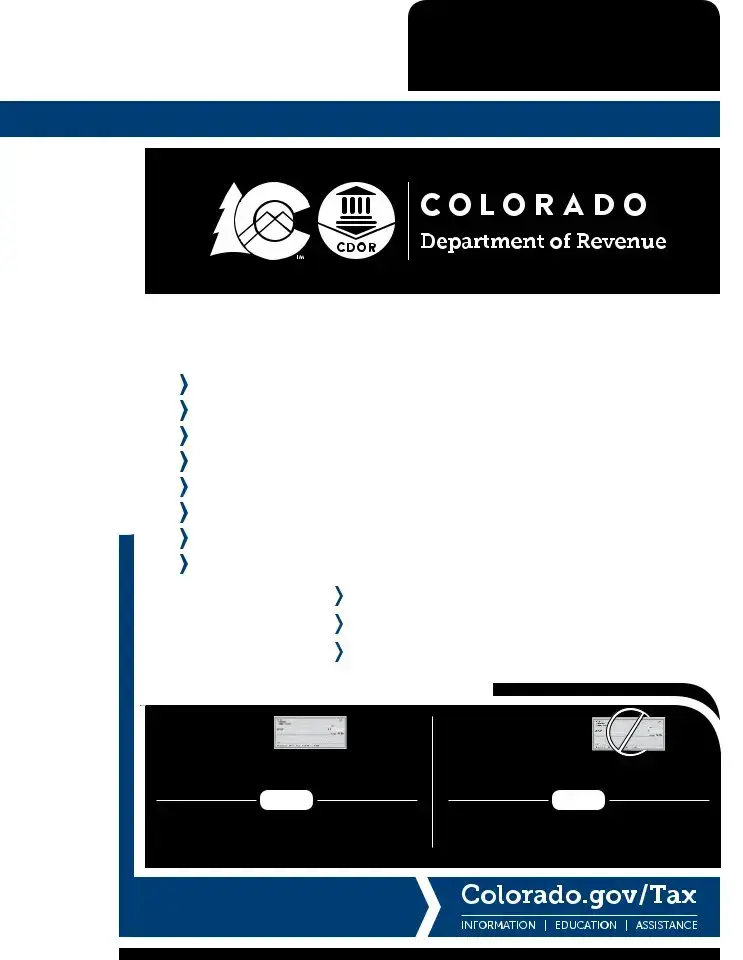
The Colorado Tax Form, specifically pertaining to the 2019 tax year, provides a comprehensive guide for full-year, part-year, and nonresident individuals navigating the complexities of filing Colorado individual income taxes. This booklet, containing necessary forms and instructions such as the DR 0104 2019 Colorado Individual Income Tax Form, DR 0104CH Voluntary Contributions Schedule, and several others tailored for specific tax situations like the DR 0104PN for Part-Year Resident/Nonresident Tax Calculation, aims to simplify the tax filing process. Detailed schedules and instructions for subtractions from income, tax payment forms, and extension payment information, among others, are meticulously compiled to assist taxpayers in accurately calculating their tax obligations or refunds. Special sections cater to the disclosure of average taxes paid and a deep dive into Colorado's revenue and expenditure, providing transparency and aiding in financial planning. Additionally, the guide addresses specific circumstances such as military service, residency status, and income adjustments, offering tailored advice to diverse taxpayer needs. Mailing instructions for filing with or without payment to the Colorado Department of Revenue are clearly outlined, emphasizing the distinct addresses to ensure proper processing. This carefully structured guide not only aims to facilitate a smooth filing experience but also underscores the importance of understanding one’s tax responsibilities and entitlements in Colorado.
Colorado Tax Example
(11/04/19)
BOOKLET INCLUDES: |
104 |
Book |
Instructions |
||
DR 0104 |
|
|
Related Forms
2019
Colorado Individual Income Tax Filing Guide
This book includes:
DR 0104 2019 Colorado Individual Income Tax Form
DR 0104CH 2019 Voluntary Contributions Schedule
DR 0900 2019 Individual Income Tax Payment Form
DR 0104AD 2019 Subtractions from Income Schedule
DR
DR 0104CR Individual Credit Schedule 2019
Disclosure of Average Taxes Paid
Colorado Income Tax Table
Description of Voluntary Contribution organizations
MAILING ADDRESS FOR FORM DR 0104
WITH |
WITHOUT |
PAYMENT |
PAYMENT |
Mail To |
Mail To |
COLORADO DEPARTMENT OF REVENUE |
COLORADO DEPARTMENT OF REVENUE |
Denver, CO |
Denver, CO |
These addresses and zip codes are exclusive to the Colorado Department of Revenue, so a street address is not required.

Page 2
Disclosure of Colorado Expenditures and Revenues
** Due to rounding, the values in each chart may not sum to 100% |
|
|
|
|
|
|
||||
Revenues by Source |
|
|
|
Expenditures by Function |
|
|||||
Other |
|
|
|
|
Transportation |
Other |
|
|
||
|
|
|
|
8.9% |
|
|
||||
3.2% |
|
|
|
|
|
|
||||
|
|
|
|
|
4.5% |
|
|
|
||
|
|
|
|
|
|
|
|
|
|
|
Federal Grants |
|
|
|
|
|
Justice |
|
|
|
|
& Contracts |
|
|
|
|
|
|
|
|
||
|
Taxes |
|
|
6.4% |
|
Education |
||||
29.7% |
|
|
|
|
||||||
|
41.1% |
Business, Community |
|
|
39.9% |
|
||||
|
|
|
|
|
||||||
|
|
|
|
& Consumer Affairs |
|
|
|
|
||
|
|
|
|
|
5.2% |
|
|
|
|
|
Interest & Rents |
|
|
|
|
|
|
|
|
|
|
2.6% |
|
|
|
|
|
|
|
|
|
|
License, Permits |
Charges for |
|
|
|
|
|
|
|
||
& Fines |
|
|
|
Social Assistance |
|
|
||||
|
Goods & Services |
|
|
|
|
|||||
2.9% |
|
|
|
|
|
|||||
|
|
|
|
35.2% |
|
|
|
|||
|
20.5% |
|
|
|
|
|
|
|||
|
|
|
|
|
|
|
|
|||
|
|
|
|
|
|
|
|
|
||
Disclosure of Average Taxes Paid |
|
|
|
|
|
|
||||
Calendar Year 2016 |
|
|
|
Average Family Money Income 1 |
|
|
|
|||
|
$0 |
$15,000 |
$30,000 |
$40,000 |
$50,000 |
$70,000 |
$100,000 |
$150,000 |
$200,000 |
|
|
to |
to |
to |
to |
to |
to |
to |
to |
and |
Weighted |
State Taxes and Fees |
$15,000 2 |
$29,999 |
$39,999 |
$49,999 |
$69,999 |
$99,999 |
$149,999 |
$199,999 |
more |
Average 3 |
|
|
|
|
|
|
|
|
|
|
|
Individual Income 4 |
$83 |
$319 |
$719 |
$1,063 |
$1,567 |
$2,428 |
$3,850 |
$5,696 |
$16,241 |
$2,544 |
Sales 5 |
$285 |
$347 |
$468 |
$487 |
$582 |
$712 |
$923 |
$1,204 |
$2,480 |
$690 |
Gasoline and Gasohol 6 |
$92 |
$117 |
$156 |
$178 |
$202 |
$240 |
$274 |
$288 |
$437 |
$198 |
Licenses 7 and Registrations 8 |
$91 |
$126 |
$162 |
$171 |
$188 |
$224 |
$250 |
$250 |
$259 |
$179 |
Alcoholic Beverages 6 |
$4 |
$3 |
$4 |
$6 |
$6 |
$9 |
$14 |
$18 |
$42 |
$9 |
Cigarettes and Tobacco 6 |
$44 |
$42 |
$48 |
$49 |
$49 |
$52 |
$50 |
$34 |
$42 |
$46 |
Total State Taxes and Fees |
$598 |
$955 |
$1,557 |
$1,955 |
$2,595 |
$3,665 |
$5,361 |
$7,491 |
$19,501 |
$3,667 |
Local Taxes and Fees |
|
|
|
|
|
|
|
|
|
|
Residential Property 5 |
$666 |
$1,024 |
$1,363 |
$1,316 |
$1,652 |
$2,128 |
$2,998 |
$4,259 |
$9,964 |
$2,240 |
Sales and Use 5 |
$446 |
$544 |
$733 |
$763 |
$912 |
$1,115 |
$1,444 |
$1,886 |
$3,882 |
$1,081 |
Specific Ownership 8 |
$94 |
$136 |
$177 |
$188 |
$209 |
$250 |
$282 |
$282 |
$292 |
$198 |
Occupation 9 |
$2 |
$6 |
$9 |
$11 |
$15 |
$22 |
$31 |
$44 |
$136 |
$23 |
Total Local Taxes and Fees |
$1,208 |
$1,709 |
$2,282 |
$2,278 |
$2,788 |
$3,515 |
$4,755 |
$6,470 |
$14,273 |
$3,542 |
Federal Taxes |
|
|
|
|
|
|
|
|
|
|
Individual Income 4 |
$609 |
$1,166 |
$2,273 |
$3,377 |
$5,318 |
$8,716 |
$14,652 |
$24,598 |
$100,649 |
$12,224 |
Medicare 10 |
$106 |
$303 |
$483 |
$630 |
$843 |
$1,198 |
$1,746 |
$2,478 |
$12,382 |
$1,595 |
Social Security 10 |
$455 |
$1,294 |
$2,067 |
$2,693 |
$3,607 |
$5,121 |
$7,347 |
$7,347 |
$7,347 |
$3,536 |
Total Federal Taxes |
$1,170 |
$2,762 |
$4,824 |
$6,699 |
$9,768 |
$15,035 |
$23,745 |
$34,422 |
$120,377 |
$17,356 |
Total Taxes and Fees Paid |
|
|
|
|
|
|
|
|
|
|
Households |
$2,977 |
$5,426 |
$8,663 |
$10,932 |
$15,150 |
$22,214 |
$33,861 |
$48,384 |
$154,152 |
$24,565 |
Taxes Paid by Employers 11 |
$561 |
$1,597 |
$2,551 |
$3,323 |
$4,450 |
$6,319 |
$9,093 |
$9,825 |
$19,729 |
$5,131 |
Federal data and other data sources are used to estimate average taxes paid when actual data are unavailable for most tax types.
The methodology for some estimates and income class categories changed from 2014 due to changes in the Bureau of Labor Statistics Consumer Expenditure Survey (CES), therefore estimates from prior years may not be comparable.
1Estimate of income uses the CES definition of “money income” which includes all sources of income, taxable and nontaxable, as well as transfer payments (such as public
assistance, supplemental security income, food stamps, and other benefits or contributions).
2Some taxpayers family money income estimate was negative. Negative income is associated with
because we cannot reliably assign them to the income categories used in this table.
3The weighted averages were calculated for each row using the average tax paid for each income class multiplied by the total number of filers in that income class. This
report’s weighted average values are not comparable to prior reports’ average values.
4Estimate is based on values from state and Federal income tax returns.
5Estimate is calculated using the CES proportion of income for the tax on that item for each class, multiplied by the Colorado average income value for each class.
6Industry data (e.g., average prices) was used to estimate the tax paid based on the CES value for that item. Then, the estimate was calculated using the CES proportion of
income for the tax on that item for each class, multiplied by the Colorado average income value for each class.
7The total state collections for drivers licenses was divided by the total number of filers, yielding a flat fee across all income classes.
8The registrations and specific ownership fees/taxes paid were estimated using the total state collections and the CES average number of vehicles for each income class.
9Total local occupation fees collected were distributed by income class.
10Medicare and Social Security taxes were estimated based on income subject to these taxes.
11Employers pay taxes to Medicare and Social Security on the employees’ behalf.
Table of Contents
Disclosure of Average Taxes Paid |
2 |
DR 0900: Individual Payment Form |
25 |
Using this Guide: Filing Instructions |
3 |
DR |
27 |
Taxpayer Service and Assistance |
8 |
DR 0104PN: |
|
Tax Table |
15 |
Tax Calculation Schedule |
29 |
DR 0104: Colorado Return for All Resident Types |
17 |
DR 0104US: Consumer Use Tax Reporting Schedule.. |
33 |
DR 0104CH: Voluntary Contributions Schedule |
21 |
DR 0104CR: Individual Credit Schedule |
35 |
DR 0104AD: Subtractions from Income Schedule .. |
23 |
Voluntary Contribution Information |
39 |

How To Use This Filing Guide
This filing guide will assist you with completing your Colorado
Income Tax Return. Please read through this guide before
starting your return. Once you finish the form, file it with a computer, smartphone or tablet using our free and secure
Revenue Online service at Colorado.gov/RevenueOnline. You may also file using private
reason, mail the enclosed forms as instructed. All Colorado
forms and publications referenced in this guide are available for download at Colorado.gov/Tax, the official Taxation website.
The following symbols appear throughout this guide and point out important information, reminders and changes to tax rules.
This points out a topic that is the source of common
filing errors. Filing your return on Revenue Online will reduce the risk of errors; however, it is important
to understand the information on your return. Errors
cause processing delays and erroneous bills.
Several subtractions and tax credits require you to provide supporting documentation. This symbol points out those requirements. If the additional documentation is not provided, it will cause processing delays or denial of the credits/ subtractions. These documents can be scanned and attached to your electronic filing through
Revenue Online or most tax software, mailed with
the DR 1778 or attached to your paper return.
publications are available in the Education and Legal Research section at Colorado.gov/Tax.
Filing Information
Who Must File This Tax Return
Each year you must evaluate if you should file a Colorado income tax return. Generally, you must file this return if you are required to file a federal income tax return with the IRS for this year or will have a Colorado income tax liability for
this year and you are:
•A
•A
•Not a resident of Colorado, but received income from sources within Colorado.
Colorado residents must file this return if they are required to file an income tax return with the IRS,
even if they do not have a Colorado tax liability.
Otherwise, the Department may file a return on your
behalf and our return might not consider your unique tax situation. Also, the only way to determine if you
are entitled to a refund is to file a return.
Due Date
Page 3
postmarked by April 15. An automatic extension to file is
granted until October 15, but there is no extension to pay. See page 27 for more information.
Deceased Persons
Legal representatives and surviving spouses may file a return on behalf of a deceased person whose date of death was
during the tax year. Surviving spouses may complete the
return as usual and indicate the deceased status on the return. They can file the return and submit a copy of the death certificate through Revenue Online. Legal represen- tatives may file the return and submit a copy of the death certificate through Revenue Online, but they must complete
the Third Party Designee portion of the return. Either a
surviving spouse or legal representative can avoid problems when filing on paper by marking the box next to the name of the deceased person, writing “DECEASED” in large letters in the white space above the tax year of the return, writing “FILING AS SURVIVING SPOUSE” or “FILING AS LEGAL REPRESENTATIVE” after their signature, and attaching the DR 0102 and a copy of the death certificate to the return.
To claim a refund on behalf of a deceased person: you must submit a copy of the death certificate with the DR 0102 when filing the return.
Filing Status
You must file using the same filing status on both your federal and Colorado income tax returns. Any two individuals who legally file a joint federal income tax
return must also file their Colorado income tax return jointly. Individuals filing a joint return must list the
taxpayer names and Social Security numbers (SSN) in the same order on both the federal and Colorado returns. For married filing separate, do not list your spouse’s name or SSN on the return.
Claiming Credits from a
Individuals claiming tax credits as a partner or shareholder must obtain from the partnership or S corporation a federal Schedule
of Revenue verifies the credit claims of partners and shareholders by reviewing the partnership or S
corporation’s return. The Schedule
may be submitted through Revenue Online, through tax software or may be attached to a paper return.
First, complete the federal income tax return you will file with the IRS because you will use information from that return
on your Colorado income tax return. Colorado income tax
is based on your federal taxable income, which has already
considered your deductions.
Residency Status
Mark the appropriate box to designate your residency status.
The DR 0104 and any tax payment owed are due April 15, 2020. Revenue Online will accept returns as timely filed until midnight. Returns that are mailed must be
If you are filing a joint return, and one person is a
Colorado resident and the other is either a

Page 4

Tax is prorated so that it is calculated only on income received
in Colorado or from sources within Colorado. We recommend you review publication FYI Income 6 if this applies to you. You will calculate your prorated tax by completing the DR 0104PN. You must submit the DR 0104PN with your return.
Persons Traveling or Residing Abroad
If you are traveling or residing outside the United States
on April 15, the deadline for filing your return is June 15, 2020. If you need additional time to file your return, you will automatically have until October 15, 2020, to file. Interest is
due on any tax paid after April 15, 2020. To avoid any late
payment penalties, you must pay 90% of your tax liability by June 15, 2020, file your return by October 15, 2020 and pay any remaining tax due at the time of filing. When filing your return, mark the “Abroad on Due Date” box on Revenue
Online or the paper return.
 Active Duty Military
Under federal law, a military servicemember’s state of legal
residence does not change solely as the result of the service-
member’s assignment for service in another state. Consequently, a Colorado resident who enters into military service will remain a Colorado resident unless they officially change their state of
legal residence as described in DD Form 2058.
In general, military servicemembers who are Colorado residents are subject to the same income tax filing requirements as other
Colorado residents, even if they are serving in another state.
These requirements are described on the preceding page, under the heading “Who Must File This Tax Return.”
However, any military servicemember who spends at least 305 days of the tax year stationed outside of the United States on
active military duty may elect to be treated as a nonresident.
The servicemember may make this election by filing a return and checking the applicable box on Form 104PN.
Military servicemembers who are stationed in Colorado, but
are not Colorado residents, are not required to pay Colorado tax on their military income. However, any other Colorado source income of a nonresident servicemember is subject to
Colorado taxation.
Please see “Military Service Members — Special Filing Information” webpage on our website for additional information.
The residency rules described above for military servicemembers also apply generally to a
servicemember’s spouse if the spouse is residing with the servicemember either inside or outside of Colorado in compliance with the servicemember’s military orders. If a servicemember and their spouse
are nonresidents stationed in Colorado, any wages earned by the spouse for work performed in Colorado are not subject to Colorado taxation. The military spouse must complete a DR 1059, provide a copy to their employer when hired for employment, and submit a copy to the Department, along with a copy of their military ID card, when they file their Colorado return each year. The DR 1059 may be filed with the Department through Revenue Online, with DR 1778,
or as an attachment to a DR 0104 filed by paper.
 Name and Address
Provide your name, mailing address, date of birth, Social
Security number, as well as the state of issue, last four digits, and the date of issuance of your state issued ID card in the provided spaces. If filing Married Filing Joint, provide the spouse’s information where prompted. Provide the spouse’s information ONLY if filing a joint return. Otherwise leave blank. All Departmental correspondence will be mailed to
the mailing address provided. We recommend you read publication FYI General 2 for the Privacy Act Notice.
Line 1 Federal Taxable Income
Refer to your federal income tax return to complete this line:
• Form 1040 line 11b
If your federal taxable income is a negative amount, be sure to enter the amount as such on your Colorado return. If submitting a paper return, put the negative amount in parentheses, for example ($1,234).
Do not enter your total income or wages on this line because it will make your tax too high. The Department will compare the amount you list here to the return you file with the IRS, so be very careful
to complete this correctly.
Additions
Line 2 State Addback
Refer to your federal income tax return to complete this line.
Enter $0 if you filed Form 1040 or 1040SR but did not itemize
your deductions on Schedule A.
Taxpayers who deduct general sales taxes on Schedule A
line 5a, Form 1040 or 1040SR, are not required to calculate this addback. If you deducted state income tax on Schedule
A line 5a, complete the worksheet below to calculate the Income Tax Deduction.
We recommend that you read publication FYI
Income 4 for special instructions before completing the worksheet below.
Complete the following worksheet to determine your state
income tax deduction addback.
a) |
Is the amount on federal Form 1040 or |
|
|
1040SR Schedule A line 5d greater than |
|
|
the amount on federal Form 1040 or |
|
|
1040SR Schedule A line 5e? |
|
|
No. Enter the state income tax |
|
|
deduction from federal Form 1040 |
|
|
or 1040SR Schedule A line 5a. |
|
|
Yes. Subtract the amounts on federal |
|
|
Form 1040 or 1040SR Schedule |
|
|
A lines 5b and 5c from the |
|
|
amount on line 5e. Enter the |
|
|
result, but not less than $0. |
$ |
b) Total itemized deductions from federal |
|
|
|
Form 1040 or 1040SR Schedule A line 17 |
$ |
|
|
|
c) |
The amount of federal standard deduction |
|
|
you could have claimed (See instructions |
|
|
federal Form 1040 or 1040SR line 9 for |
|
|
2019 federal standard deductions.) |
$ |
$
Transfer to line 2 of the DR 0104 the smaller amount from line (a) or (d) of the worksheet above.

Line 3 Other Additions
Enter the sum of the following and specify which addition(s)
in text box:
 • Bond
from bonds issued by any state or political subdivision, excluding any bonds issued by the State of Colorado or its political subdivisions on or after May 1, 1980. Calculate the appropriate amount by subtracting the amortization of bond premiums and expenses (required to be allocated to interest income by Internal Revenue Code) from the gross amount of state and local bond interest. We recommend that you read publication FYI Income 52 if this applies to you.
•Improper distributions from a qualified state tuition program for which tuition program contribution subtraction was previously claimed. See FYI
Income 44 for additional information.
•Dependent child
•Charitable gross conservation
 • Alien
unauthorized alien labor services. We recommend that you read publication FYI Income 64 if this applies to you.
•
•Any expenses incurred by a taxpayer with respect to expenditures made at, or payments made to, a club that restricts membership on the basis of sex, sexual orientation, marital status, race, creed, religion, color, ancestry or national origin.
•Distributions from a medical savings account not made for an eligible expense.
•Charitable hunger relief credit
amount of your federal charitable deduction for a donation for which a Credit for Food Contributed to
Line 4 Subtotal
Enter the sum of lines 1 through 3.
Line 5 Subtractions from the DR 0104AD Schedule, line 20
Transfer the amount from the DR 0104AD line 20 to report
any subtractions from your Federal Taxable Income. These subtractions will change your Colorado Taxable Income from
the amount of Federal Taxable Income. See instructions in the income tax booklet for additional guidance on completing this schedule. Do not enter negative amounts. To ensure faster processing of your paper return, the amount entered
Page 5
on line 5 must exactly match the amount on the DR 0104AD.
You must submit the DR 0104AD with your return.
Line 6 Colorado Taxable Income
Subtract line 5 from line 4. This is your Colorado taxable income and is the figure used to determine how much Colorado tax is owed, if any.
Line 7 Colorado Tax
The income tax rate is currently 4.5%.
should transfer the apportioned tax amount from the DR 0104PN line 36. You must submit the DR 0104PN with your return.
Line 8  Alternative Minimum Tax
Enter the amount of any Alternative Minimum Tax. Generally, if you
pay alternative minimum tax on your federal income tax return, you will pay the same for your Colorado return. We recommend
that you read publication FYI Income 14 if this applies to you.
Line 9 Recapture of Prior Year Credits
Enter any credit claimed in prior years that is subject to recapture under Colorado law.
Line 10 Subtotal
Sum of lines 7 through 9.
Tax Credits
Visit
about which tax credits can be claimed on this form.
Line 11 Nonrefundable Credits
Complete the DR 0104CR to claim various nonrefundable credits. Transfer the amount from the DR 0104CR line 41 to
this line. The nonrefundable credits used from the DR 0104CR combined with the total Nonrefundable Enterprise Zone Credit
used cannot exceed line 10. To ensure faster processing of your paper return, the amount entered on line 11 must exactly
match the amount on the DR 0104CR. You must submit the
DR 0104CR with your return.
Scan and submit any required documentation through Revenue Online
to your electronic return or mail paper documentation with the DR 1778
Line 12 Nonrefundable Enterprise Zone Credits
Use your tax software, Revenue Online or the DR 1366 to calculate the total amount of Nonrefundable Enterprise Zone
Credits being used to offset the current year tax liability.
Complete the DR 1366 and transfer line 87 to this line. The total Nonrefundable Enterprise Zone Credit used combined with nonrefundable credits from the DR 0104CR cannot
exceed the amount on line 10. You must submit the DR 1366 and a copy of each certificate with your return.
The Department strongly recommends electronic filing for taxpayers with enterprise zone credits. Failure to file electronically may result in delays processing your return.

Page 6
Line 13 Strategic Capital Tax Credits
Use your tax software, Revenue Online or the DR 1330 to calculate the total amount of nonrefundable Strategic Capital Tax Credits being used to offset the current year tax liability. Complete the DR 1330 and transfer amount on line 5b to this
line. The total nonrefundable Strategic Capital Tax Credits used combined with nonrefundable credits from lines 11 and
12 cannot exceed the amount on line 10. You must submit the
DR 1330 and a copy of each certificate with your return. The Department strongly recommends electronic filing for taxpayers with Strategic Capital Tax credits. Failure to file
electronically may result in delays processing your return.
Please include a copy of each Strategic Capital Tax Credit Certificate
Line 14 Net Income Tax
Sum of lines 11, 12, and 13. Subtract that sum from line 10. This cannot be a negative number.
Line 15 Use Tax
Enter the amount from the DR 0104US schedule line 7. If you
did not have any purchases from retailers who do not collect
Colorado state sales tax, then leave this line blank and DO
NOT fill out the DR 0104US schedule. For more information on your consumer use tax obligation, including how to use the new
annual customer reports from
visit Colorado.gov/Tax/UseTax. If you are reporting use tax on this return, you must submit the DR 0104US with your return.
Line 16 Net Colorado Tax
Sum of lines 14 and 15.
Line 17 Colorado Income Tax Withheld
Enter the sum of all Colorado income tax withheld as reported on
Enclose your Colorado withholding forms where indicated or, if filing electronically, scan and submit them through Revenue Online
Failure to submit your withholding forms will
result in the credit being denied. Do NOT include
withholding for federal income tax, income tax from
another state, or income tax from local governments.
Be certain to exclude amounts withheld from
Colorado real estate sales by nonresidents, nonresident beneficiary withholding, or Colorado partnership or S Corporation income withholding
for nonresidents because these specified amounts should be listed on line 21.
Line 18
Enter the amount, if any, from your 2018 Colorado DR 0104 line 27.
Line 19  Quarterly Estimated Payments
Carefully review your payment(s) before completing this
line. Use Revenue Online (Colorado.gov/RevenueOnline) to verify estimated taxes paid on your account. Doing so will reduce processing delays. Most taxpayers who have made
quarterly estimated payments used the DR 0104EP to remit these payments. Refer to FYI Income 51 for more information about Estimated Payments.
Line 20 Extension Payment
Enter the amount, if any, you remitted with the DR
Line 21 Other Prepayments
Enter the sum of payments remitted on your behalf because
you received Colorado income from:
•an estate as a beneficiary – remitted using the
DR 0104BEP, and/or
•partnership or shareholder
•a real estate transaction that closed during the tax year for which you are filing this return
– remitted using the current DR 1079.
Be sure to mark corresponding box(es) as appropriate.
Line 22 Gross Conservation Easement Credit
Complete all applicable parts of the DR 1305. Enter the
amount from the DR 1305G line 33. You must submit the
DR 1305G with your return.
Line 23  Innovative Motor Vehicle and
Innovative Truck Credit
Complete one Form DR 0617 for each vehicle, truck, trailer, or modification claimed, then enter the amount (or sum) from
each DR 0617 line 9 and/or line 18. You must submit each DR 0617 with your return. NOTE: If you assigned the credit to a financing entity you will not submit a Form DR 0617. For
additional information, please refer to FYI Income 69.
For each Form DR 0617, you must also submit copies
of the title, purchase invoice, lease agreement, or conversion receipts, along with proof of permanent Colorado registration for each vehicle for which you
are claiming a credit. For financing entities that accept assignment of the credit, a completed Form DR 0618 must be submitted for each vehicle claimed.
Line 24 Refundable Credits
Complete the DR 0104CR to claim various refundable credits. Transfer the amount from the DR 0104CR line 8 to this line.
You must submit the DR 0104CR with your return.
See the DR 0104CR for the required documentation for the credit claimed. Submit using Revenue Online, attach to an electronically filed return as a PDF or attach to your paper return.
Line 25 Subtotal
Sum of lines 17 through 24.
Line 26 Federal Adjusted Gross Income
Refer to your 2019 federal income tax return to complete this line:
• Form 1040 line 8b
If your federal adjusted gross income is a negative amount, be sure to enter the amount as such on your Colorado return. If submitting a paper return, put the negative amount in parentheses, for example ($1,234).
Compare lines 16 and 25. If line 16 is greater, skip to line 38. If line 25 is greater, continue to line 33.
Line 33 Overpayment
Subtract line 16 from line 25.
Line 34 Estimated Tax Carryforward
Enter the amount, if any, you would like to be available for
2020 estimated tax.
Line 37 Refund
Subtract line 34 from line 33. This is the amount of your refund. You have the option of authorizing the Department
to directly deposit these funds to your bank or CollegeInvest account. Otherwise, a refund check will be mailed to the
address you have designated on this return.
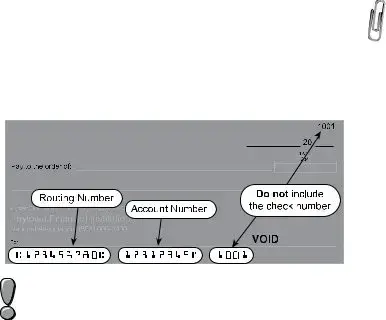
•Direct
symbols. We recommend that you contact your financial institution to ensure you are using the correct information and that they will honor a direct deposit. See the sample check below to assist you in finding the account and routing numbers.
Did you know you can now direct deposit your tax refund into a new or existing CollegeInvest
account? Please contact
•Intercepted
only one party is responsible for the unpaid debt, you may file a written claim to: Injured Spouse
Desk, 1375 Sherman Street, Room 240, Denver, CO 80261. Claims must include a copy of your federal income tax return, federal form 8379 and copies of all
received by both parties. DO NOT attach your claim to this return. It will not be processed.
Line 38 Net Tax Due
Subtract line 25 from line 16. This is the amount you owe with this return. If you are filing after the due date (or valid extension) or you owe estimated tax penalty, continue to the next line. If you are filing timely and do not owe penalty or interest, go to line 42.
Line 39 Delinquent Payment Penalty
Calculate any penalty owed for delinquent filing or payment.
The penalty is the greater of $5 or 5% of the net tax due for the first month after the due date and increased by 0.5%
for each additional month past the due date. The maximum penalty is 12%. If you prefer not to calculate this penalty, the
Department will bill you.
Page 7
Line 40 Delinquent Payment Interest
Calculate any interest owed for delinquent filing or payment.
The interest rate is 6% of the net tax due. If you prefer not to
calculate this interest, the Department will bill you. Interest on
any bill issued that remains unpaid after 30 days of issuance will increase to 9%.
Line 41 Estimated Tax Penalty
To calculate this penalty, complete the form DR 0204. Enter any estimated tax penalty owed on this line. You must submit the DR 0204 with your return. If you over compute your estimated tax penalty from what the Department calculates, any amount of overpayment of penalty will be refunded to you.
Scan and submit the form DR 0204 through Revenue Online
Line 42 Amount You Owe
Enter the sum of lines 38 through 41. You have three payment options. Please note: Any assessment made by the
Department will likely include delinquent payment penalty and interest. The only way to avoid paying penalty and interest is to pay in full by the filing due date.
•Pay
Transfer (EFT). A nominal processing fee may apply. If you file a paper return, you may still choose to pay electronically. Visit Colorado.gov/ RevenueOnline for details.
•Pay by
send a check or money order, complete the form
DR 0900 and mail with your payment. Make payable to “Colorado Department of Revenue” and clearly write your Social Security number and “2019 DR 0104” on the memo line. Be sure
to keep a copy of the money order or note the check number with your tax records.
•Payment
Third Party Designee
Mark the “Yes” box to allow the Colorado Department of Revenue to discuss this tax return with the paid preparer or designee who signed it. This authorization is valid for any period of time and can be revoked with a written statement to the Department. Revocations must declare the return filing
period and tax type, must designate that the Third Party Designee is being revoked and must be signed and dated by the taxpayer and/or designee. By completing this area of the return, the taxpayer is granting the designee the ability to:
•Provide any missing information needed for the processing of the return, and
•Call the Department for information about the return, including the status of any refund or processing time, and

Page 8
•Receive upon request copies of notices, bills or transcripts related to the return, and
•Respond to notices about math errors, intercepts and questions about the preparation of the return.
This designation does not allow the third party to receive any
refund check, bind the taxpayer to anything (including any additional tax liability), or otherwise represent the taxpayer
before the Colorado Department of Revenue. In order to expand the designee’s authorization, complete the DR 0145
Power of Attorney for
When filing a paper return, all
filing an electronic return, attach scanned copies of all
attach
Taxpayer Service and Assistance
Revenue Online and Secure Messaging
The Department offers many services through Revenue Online.
You can file or amend a return, submit required return attachments,
monitor your account activity, pay taxes, check the status of a
refund, file a protest and send a secure message to Department staff. Visit Colorado.gov/RevenueOnline to get started.
 Taxation Website
Visit the official Colorado Department of Revenue’s Taxation Division website, Colorado.gov/Tax, for tax
forms, FYI publications, education resources, legal research and more.
Call Center
Representatives are available Monday through Friday, 8 a.m. to 4:30 p.m.
TTY/TDD
Forms and information are available Monday through Friday, 8 a.m. to 4:30 p.m.
Colorado
Common Issues
Did Not Receive
•Contact your employer to request a copy, or
•Use the
stub to complete a Substitute
DR 0084 and submit both with your return.
Records Retention
Keep all documentation you used to prepare your return
at least 4 years after the due date, which is the statute of
limitations for the Department to make changes to your return.
However, if the Department does not receive your return, they may file on your behalf using the best information available.
There is no statute of limitations for assessment if a return is
not filed.
Correcting Errors or Changing a Return
Individual income tax returns from 2009 and forward may be amended electronically through Revenue Online. Filing and
amending returns in Revenue Online is a free service. You may amend online even if the original return was filed on paper.
Revenue Online has all the information from your original return. You will not need to
•If you cannot amend online, you may file the
DR 0104X. Make sure you use the appropriate form version for the year you are amending.
•If you are changing your Colorado return
because the IRS made changes to your federal return, you must file the DR 0104X within 30 days of being notified by the IRS. You must amend your Colorado return in this case, even if there is no net change to your tax liability.
IT IS VERY IMPORTANT THAT YOU SUBMIT ALL SCHEDULES AND SUPPORTING DOCUMENTATION FOR ANY CHANGES WITH YOUR AMENDED RETURN. YOU MUST SUBMIT ALL SCHEDULES, EVEN IF YOU ARE NOT CHANGING THOSE VALUES.
 Estimated Tax Requirements
If you expect next year’s Colorado tax liability to be greater than $1,000 after subtracting credits, you should make estimated tax payments using the DR 0104EP. We recommend that you read publication FYI Income 51 for additional information.
Filing Errors and Incomplete Information
It is important to read all the information available for your specific tax situation and to submit all required documentation with your return. Failure to do so may result in delayed
processing of your return and refund, if any. We recommend that you file using Revenue Online to avoid common
mathematical errors. You may also opt to use a commercial tax preparation software program or a paid tax professional
to help you complete your return.
Federal Earned Income Tax Credit and Colorado Insurance Programs
Individuals whose income does not exceed certain
thresholds and/or have qualifying children may be eligible for a refund resulting from the federal Earned Income Tax
Credit (EITC) and/or
Child Health Plan Plus (CHP+). You may obtain additional information regarding the EITC online at IRS.gov or by calling Colorado United Way at 211. Additional information regarding CHP+ may be found at CCHP.org or by calling

If you use this schedule to claim any subtractions from your income, you must submit it with the DR 0104.
Line 1 State Income Tax Refund
Refer to your federal income tax return to complete this line. If you did not complete federal Schedule 1,
Form 1040 or 1040SR, enter $0. Otherwise, enter the amount from line 10, Schedule 1, Form 1040 or 1040SR.
Line 2  U.S. Government Interest
Enter the sum of all interest earned from U.S. government bonds, treasury bills and other obligations of the U.S. or its territories, possessions and agencies that you reported on your federal income tax return and is calculated as part of your federal taxable income. We recommend that you read publication FYI Income 20 if this applies to you.
Do not include interest earned from Federal National Mortgage Association and Government National Mortgage Association (Fannie Mae and Ginnie Mae). Dividends from mutual funds may not be 100% exempt.
Line 3  Pension and Annuity
Subtraction
You might be eligible to subtract the income you earned from a
pension or annuity. We recommend that you read publication
FYI Income 25 if this applies to you. This subtraction is allowed only for pension or annuity income that is included in your federal taxable income. The amount of subtraction you can claim is also limited based upon your age.
As of December 31, 2019, if you were:
•Age 65 or older, then you are entitled to subtract
$24,000 or the total amount of your taxable pension/annuity income, whichever is smaller; or
•At least 55 years old, but not yet 65, then you are entitled to subtract $20,000 or the
total amount of your taxable pension/annuity income, whichever is smaller; or
•Younger than 55 years old and you received
pension/annuity income as a secondary beneficiary (widow, dependent child, etc.) due to the death of the person who earned the pension/annuity, then you are entitled to
subtract $20,000 or the total amount of your secondary beneficiary taxable pension/annuity income, whichever is smaller. If this applies to you, please list the Social Security number of the deceased in the space provided.
Pension/annuity income should not be intermingled between spouses. Each spouse must meet the
requirements for the subtraction separately and claim the subtraction only on their pension/annuity income. Any qualifying spouse pension/annuity income should be reported on line 4.
Submit copies of all 1099R and
Revenue Online or attach to your paper return.
Page 9
Line 4  Spouse Pension and
Annuity Subtraction
If the secondary taxpayer listed on a jointly filed return is
eligible for the pension and annuity subtraction, enter the qualifying amount on this line. Review the instructions for line 3 to see what amount qualifies. We recommend that
you read publication FYI Income 25 if this applies to you.
Take precautions to report the subtraction on the correct line. The first person listed on the return shall report on line 3 and the second person listed shall report on line 4.
Line 5  Military Retirement Subtraction
You might be eligible to subtract the income you earned from your military retirement benefits. We recommend
that you read publication FYI Income 25 if this applies to you. This subtraction is allowed only for military
retirement income that is included in your federal taxable income. To qualify, you must have been 54 years of age or younger as of December 31,2019. If you meet the age requirement, then you are entitled to subtract $4,500
or the total amount of your taxable military retirement benefits, whichever is smaller.
Military retirement benefits should not be intermingled between spouses. Each spouse must meet the
requirements for the subtraction separately and claim the subtraction only on their military retirement benefits. Any qualifying spouse military retirement benefits should be reported on line 6.
Submit copies of all 1099R statements with your return. Submit as attachments when
paper return.
Line 6  Spouse Military Retirement
Subtraction
If the secondary taxpayer listed on a jointly filed return is
eligible for the military retirement subtraction, enter the qualifying amount on this line. Review the instructions for line 5 to see what amount qualifies. We recommend that you
read publication FYI Income 25 if this applies to you.
Take precautions to report the subtraction on the correct line. The first person listed on the return must report on line 5 and the second person listed must report on line 6.
Line 7  Colorado Capital Gain
Subtraction
You might be eligible to subtract some or all of the capital gain included in your federal taxable income, if the gain is derived from the sale of tangible personal property or from the sale of real property located in Colorado. The amount of this subtraction is limited to $100,000. We recommend that you read publication FYI Income 15 if this applies to you.
You must complete and submit the DR 1316 with your return. Take precaution to completely fill out
each item of this form. Be as detailed as possible, especially when providing property descriptions, ownership, and dates of acquisition and sale.

Page 10
Line 8  CollegeInvest Contribution
Contributions to CollegeInvest can be deducted from your return. The contribution must have been included on your federal income tax return and calculated as part of your federal taxable income. We recommend that you read publication FYI Income 44 if this applies to you.
The three fields on line 8 should be left blank if the
taxpayer and/or spouse are the CollegeInvest account owners who set up the account for the student beneficiary. If you are not the account owner (e.g.
grandparent, friend,) complete the three additional fields. To report contributions to more than one account, you must file electronically. Do not deduct
contributions made to a tuition savings plan for another state or any tuition you paid while attending school.
Do NOT deduct contributions made by your employer/ business to your College Invest account on this line. To claim
Line 9  Qualifying Charitable Contributions
Taxpayers who make charitable contributions that would be eligible for a federal income tax deduction, but do not claim federal itemized deductions on Schedule A of form 1040 or 1040SR, might be eligible to deduct a portion of their contribution on this form. We recommend that you read publication FYI
Income 48 if this applies to you. Use the worksheet on the next
page to determine your qualifying contribution.
(a) Did you itemize your deductions on Schedule |
|
|
A of federal form 1040 or 1040SR? |
Yes |
No |
|
|
|
(b) Did you deduct charitable contributions on |
|
|
the federal form? |
Yes |
No |
|
|
|
If you answered Yes on either (a) or (b) above, enter $0 on line 9; you do not qualify for this subtraction. If you answered No on both
(a) and (b) above, continue below.
(c)Enter the amount you could have deducted as charitable contributions on lines 11 and
12 of federal Schedule A. |
$ |
|
|
(d) Colorado adjustment |
$500 |
(e)Subtract line (d) from line (c). This is the qualifying amount. If the amount is greater than $0, transfer to line 9.
Enter the total contributions in the space provided and the subtraction after the $500 adjustment on line 9.
Do not enter an amount on this line if you already
deducted your charitable donation on Schedule A of the federal 1040 or 1040SR form. Otherwise, you will be issued an assessment that will likely include
penalty and interest.
For claims greater than $5,000, submit the receipts you received at the time of donation. For
Online or attach to your paper return. Do not send receipts of items that were purchased for donation.
Line 10 Qualified Reservation Income
List any amount of income that was derived wholly from reservation sources by an enrolled tribal member who lives on the reservation, which was included as taxable income on
the Federal income tax form.
Submit proof of tribal membership, residence, and source of income. This must be submitted every three years by taxpayers claiming this subtraction.
Line 11  PERA/DPSRS Subtraction
If you made contributions to PERA between July 1, 1984, and December 31, 1986, or to Denver Public Schools District No. 1 Retirement during 1986 and your 2019 federal taxable income includes pension income, see FYI Income 16 to determine if you can take a subtraction for any of your pension income.
Submit a copy of your previously taxed contribution. PERA statements can be obtained from Copera.org or by calling
Do not list the amount of contributions you made as an employee this past year.
Line 12  Railroad Benefit
List any railroad retirement benefits that you reported on your federal income tax return and is calculated as part of your federal taxable income. We recommend that you read publication FYI Income 25 if this applies to you.
Submit copies of all
Statements. Submit using Revenue Online or submit with your paper return.
Line 13  Wildfire Mitigation Measures
Enter the amount incurred in performing wildfire
mitigation on your land, up to $2,500. We recommend that you read publication FYI Income 65 to properly calculate this subtraction.
Submit copies of receipts for qualified costs for wildfire
mitigation for your property. Submit using Revenue
Online or submit with your paper return.
Line 14 Colorado Marijuana Business Deduction
For
expenditure that is eligible to be claimed as a federal income tax deduction but is disallowed by section 280E of the Internal Revenue Code because marijuana is a controlled substance under federal law.
To calculate this deduction, you must create pro forma federal schedule(s) for Business Profit or Loss as if the federal government would have allowed the expenditures from the marijuana business. The Colorado deduction shall be the difference between the profit/loss as calculated on the ACTUAL schedule(s) filed with the federal return and the pro
forma schedule(s) described above.
You must submit both the pro forma federal schedule(s) and the actual federal schedule(s) with your Colorado return when claiming this deduction. Submit using Revenue Online or submit with your paper return.
Document Specifics
| Fact Name | Description |
|---|---|
| Form Content and Purpose | The booklet includes the Colorado Individual Income Tax Form (DR 0104) and related schedules for 2019, meant for full-year, part-year, and nonresident individuals. |
| Mailing Addresses | There are separate mailing addresses for form DR 0104 submissions with and without payment, specific to the Colorado Department of Revenue. |
| Governing Law | The Colorado Revised Statutes govern the filing requirements and guidelines for the Colorado Individual Income Tax. |
| Due Date | The form and any payment due are postmarked by April 15, with an automatic extension to October 15 for filing. However, there's no extension to pay. |
Guide to Writing Colorado Tax
Once you've gathered all necessary information, including your federal income tax return and any related documents for your Colorado tax filing, follow these clear steps to complete the Colorado Tax form. Regardless of where you're at in life - whether you're a long-time resident, new to Colorado, or living here part-time - it's important to carefully fill out your tax forms to ensure accuracy and compliance with state laws. Let's walk through the process together to ensure everything is completed correctly.
- Gather all required documentation, including your federal tax return, W-2 forms, 1099 forms, and any deduction or credit supporting documents.
- Identify the correct forms you need to complete based on your residency status and other personal circumstances, such as the DR 0104 form for Colorado Individual Income Tax and any applicable schedules like DR 0104AD for Subtractions from Income Schedule or DR 0104CR for Individual Credit Schedule.
- Begin by entering your name, address, Social Security number, and other required personal information as prompted on the form.
- Refer to your federal income tax return to fill in your federal taxable income on line 1 of the DR 0104 form.
- Calculate and enter any additions to income, as necessary, on lines 2 and 3.
- Calculate your subtotal on line 4 by adding lines 1 through 3.
- If applicable, complete the DR 0104AD for any subtractions from income you are eligible for and transfer the total subtraction amount to line 5.
- Determine your Colorado taxable income by subtracting line 5 from line 4 and enter the result on line 6.
- Calculate your Colorado income tax using the rate provided and your taxable income amount, entering the tax on line 7.
- If applicable, enter any alternative minimum tax or recapture of prior year credits on lines 8 and 9, respectively.
- Add lines 7 through 9 to get your subtotal, which you'll place on line 10.
- Fill out the DR 0104CR form if claiming any nonrefundable credits, and enter the total from line 41 of the DR 0104CR on line 11 of the DR 0104.
- Complete the DR 1366 form if you're claiming any Nonrefundable Enterprise Zone Credits and transfer the total from line 87 to line 12 of the DR 0104.
- Follow the remaining instructions on the form for calculating your net tax owed or refund due, ensuring to include any payments or withholdings already made.
- Review your entire return for accuracy.
- Choose your filing method: electronically through Colorado's Revenue Online service, e-File using approved software, or by mailing in paper forms to the respective address with or without payment as instructed.
After submitting your return, keep a copy of all documents filed for your records. By following these steps carefully, you can confidently navigate the process of filing your Colorado income tax return. Remember, electronic filing is recommended for quicker processing and potentially faster refunds.
Understanding Colorado Tax
-
What is included in the Colorado Tax Form booklet?
The booklet contains essential forms and instructions for the 2019 tax year, including the Colorado Individual Income Tax Form (DR 0104), the Voluntary Contributions Schedule (DR 0104CH), the Individual Income Tax Payment Form (DR 0900), Subtractions from Income Schedule (DR 0104AD), Extension Payment Form for Colorado Individual Income Tax (DR 0158-I), Part-Year Resident/Nonresident Tax Calculation Schedule (DR 0104PN), Consumer Use Tax Reporting Schedule (DR 0104US), the Individual Credit Schedule (DR 0104CR), and sections on average taxes paid, along with other related information and guides.
-
Where should I mail my Colorado Tax Form DR 0104?
If you are mailing your form with a payment, send it to COLORADO DEPARTMENT OF REVENUE, Denver, CO 80261-0005. Without payment, mail it to COLORADO DEPARTMENT OF REVENUE, Denver, CO 80261-0006. Remember, these addresses don't require a street address because they are exclusive to the Colorado Department of Revenue.
-
Who needs to file a Colorado income tax return?
If you are a full-year resident, a part-year resident who received taxable income while residing in Colorado, or a nonresident who received income from Colorado sources and are required to file a federal income tax return, you must file a Colorado income tax return. Additionally, if you have a Colorado income tax liability for the year, filing is necessary to determine if you are eligible for a refund.
-
When is the Colorado income tax return due?
The return and any payment owed are due by April 15th following the tax year. If that date falls on a weekend or holiday, the due date is the next business day. An automatic extension until October 15th is available, but it does not extend the time to pay any tax due.
-
How should I file if a taxpayer is deceased?
A legal representative or surviving spouse can file a return on behalf of a deceased taxpayer. The return should be completed as usual, indicating the deceased status. "DECEASED" should be written in large letters above the tax year on the return, along with either "FILING AS SURVIVING SPOUSE" or "FILING AS LEGAL REPRESENTATIVE" after the signature. Attach the DR 0102 form and a copy of the death certificate.
-
Can I claim credits from a pass-through entity?
Yes, if you're claiming tax credits as a partner or shareholder from a pass-through entity, you'll need a federal Schedule K-1 or other statement showing the credit type and amount. The Colorado Department of Revenue verifies these credit claims by reviewing the return of the partnership or S corporation. Ensure the Schedule K-1 or statement is included with your Colorado tax return submission.
-
What if I am a part-year resident or nonresident?
If you are a part-year resident or nonresident, tax is prorated based on income received from or sourced within Colorado. Complete the DR 0104PN to calculate your prorated tax, which must be submitted with your return. For more detailed guidance, review the applicable sections in the filing guide or refer to publication FYI Income 6.
-
How do active duty military members file?
Colorado residents on active military duty remain Colorado residents for tax purposes unless they officially change their state of legal residence. Military personnel stationed outside the US for at least 305 days can file as nonresidents. Nonresident military members stationed in Colorado do not have to pay Colorado tax on their military income but must report any other Colorado-sourced income. See the "Military Service Members — Special Filing Information" on the Colorado Department of Revenue website for more details.
-
What should I do if I have additions or subtractions to report on my Colorado income tax?
If you have specific additions or subtractions from your federal taxable income, they must be calculated and reported on the respective schedules (DR 0104AD for subtractions, for example). Ensure you follow the guidelines provided in the tax filing guide booklet and attach any relevant schedules or forms to your Colorado tax return.
Common mistakes
Filling out tax forms can be like navigating a complex maze, and the Colorado Tax Form is no exception. Every year, individuals make mistakes that can lead to headaches, delays, and sometimes, missed opportunities for a better tax outcome. To help steer clear of these pitfalls, here are seven common errors made when completing the Colorado Tax Form:
Incorrect Filing Status: It’s crucial to use the same filing status on your Colorado tax return as you do on your federal return. Mixing these up can cause discrepancies and result in processing delays.
Missing Signatures: An easy miss but a big one. Forgetting to sign your tax return invalidates it. If filing jointly, both parties must sign.
Math Errors: In the age of digital submissions, math mistakes should be less common, but for those still filling out forms by hand, errors in calculations can lead to incorrect tax liabilities or refunds.
Income Reporting Errors: Not reporting all income sources, including those from part-time jobs, investments, or any out-of-state income, can lead to an incorrect return.
Overlooking Credits or Deductions: Many forget to claim state-specific credits or deductions they’re entitled to, which could reduce their overall tax bill.
Incorrect Address Information: Using an old or incorrect address can delay processing and any potential refunds due.
Failure to Attach Required Documents: Certain deductions and credits require additional documentation. Not attaching these files can delay processing and affect your return.
Avoiding these errors can make the process smoother, ensuring your tax return is processed efficiently and accurately. Always double-check your return for these common oversights before submission.
Documents used along the form
When dealing with taxes in Colorado, it's essential to have a clear understanding of the variety of forms and documents that may accompany your Colorado Tax Form for an efficient and thorough filing process. Below is an overview of documents often used in conjunction with the Colorado Tax form, ensuring comprehensive tax compliance.
- W-2 Forms (Wage and Tax Statements): These forms report an employee's annual wages and the amount of taxes withheld from their paycheck. They're crucial for accurately reporting your income and calculating taxes owed.
- 1099 Forms: These documents report income from sources other than wages, salaries, and tips. This can include income from self-employment, investments, and rent. There are several types of 1099 forms, depending on the income source.
- Schedule A (Form 1040) - Itemized Deductions: If you choose to itemize deductions instead of taking the standard deduction, Schedule A is required. This can include medical expenses, mortgage interest, and charitable donations.
- Schedule C (Form 1040) - Profit or Loss From Business: Used for reporting income or loss from a business you operated or a profession you practiced as a sole proprietor.
- Schedule D (Form 1040) - Capital Gains and Losses: Utilized to summarize capital gains and losses from investment property exchanges, including stocks, bonds, real estate, and more.
- Schedule E (Form 1040) - Supplemental Income and Loss: For reporting income or loss from rental real estate, royalties, partnerships, S corporations, estates, trusts, and residual interests in REMICs.
- Schedule SE (Form 1040) - Self-Employment Tax: Required for those who have earned income from self-employment. It calculates the self-employment tax owed to Social Security and Medicare.
- DR 1778 (E-Filer Attachment Form): This form is used for scanning and attaching required documentation to your electronic filing. It's necessary when you're required to provide additional documentation for tax credits and subtractions.
- DR 8453 (Colorado Individual Income Tax Declaration for Electronic Filing): This form serves as a declaration for electronic filing and is required when filing your taxes online. It confirms the authenticity of the electronic tax return.
Understanding and gathering these documents prior to filing can significantly streamline the process, ensuring all relevant information is correctly reported and potentially reducing errors. Remember, proper tax filing isn't just about submitting the Colorado Tax Form; it's about compiling a comprehensive financial snapshot with the necessary supporting documents and forms to ensure accuracy and compliance with state tax regulations.
Similar forms
The Colorado Tax form closely relates to the Federal Income Tax Return (1040), as it requires information from this document to accurately calculate state tax obligations. Just like the Federal Return highlights income, deductions, and credits applicable at the national level, the Colorado Tax form adjusts these figures to comply with state tax laws, providing a state-specific tax calculation based on the federal taxable income already determined. This connection ensures taxpayers' income is consistently reported while accounting for state-specific tax rules.
The Voluntary Contributions Schedule (DR 0104CH) mirrors the concept behind the Schedule A (Itemized Deductions) of the federal tax system, where taxpayers can itemize deductions to decrease their taxable income. In Colorado’s version, rather than deducting from taxable income, taxpayers can directly contribute a portion of their refund or pay extra towards selected causes, evidencing a direct engagement with community and state needs similar to the charitable deductions on the Schedule A.
Payment forms like the DR 0900 for individual income tax are akin to the federal payment voucher, Form 1040-V, used when submitting payments with tax returns. Both serve the purpose of facilitating the payment process for taxpayers who owe taxes, ensuring payments are correctly applied to their accounts. These forms act as a bridge between the taxpayer’s payment and their return, guaranteeing accurate processing by their respective tax authorities.
The Extension Payment for Colorado Individual Income Tax (DR 0158-I) draws parallels with the Federal Form 4868, which is used to request an automatic extension of time to file a personal income tax return. Both forms do not extend the time to pay taxes due, creating a critical reminder for taxpayers that filing for an extension does not alleviate immediate tax liabilities. This similarity emphasizes the importance of planning for tax payments, regardless of the filing extension.
Subtractions from Income Schedule (DR 0104AD) in the Colorado tax documents is similar to the federal Schedule 1 (Form 1040), Additional Income and Adjustments to Income. Both documents allow taxpayers to reduce their taxable income by reporting specific types of deductions not listed on the main tax form, such as educator expenses or student loan interest. This highlights the tailored approach both federal and state levels take to account for various income adjustments impacting taxpayers’ obligations.
The Part-Year Resident/Nonresident Tax Calculation Schedule (DR 0104PN) is the state counterpart to the federal Form 1040NR, used by nonresident aliens to report income from U.S. sources. Both forms cater to the unique tax situations of individuals who have not spent the entire tax year in the jurisdiction, calculating tax obligations based on the portion of the year the taxpayer was resident, aligning state and federal approaches to handling part-year and nonresident taxable income.
The Consumer Use Tax Reporting Schedule (DR 0104US) can be compared to the federal use tax reporting mechanisms, which are often reflected on state income tax returns or separate use tax declaration forms for purchases not subject to sales tax at the point of sale. This schedule allows Colorado residents to comply with tax obligations on untaxed purchases, similar to how federal and other state systems work to ensure tax is collected on interstate or online purchases that bypass traditional sales tax collection.
The Individual Credit Schedule (DR 0104CR) shares its foundational concept with the federal Schedule 3 (Form 1040), Non-refundable Credits. Both forms offer taxpayers the opportunity to lower their tax bill through various credits, reflecting the government's policy priorities by incentivizing certain behaviors or providing relief for specific situations. This parallel structure between state and federal credits showcases how tax policy is utilized to influence and support taxpayer activities at different governance levels.
Lastly, the Disclosure of Average Taxes Paid closely resembles the federal tax brackets and effective tax rate calculations, providing taxpayers with an overview of how their contributions fit within the broader tax landscape. Both structures are designed to offer transparency and insight into the tax collection process, ensuring taxpayers understand their role and the significance of their contributions to public finances and services.
Dos and Don'ts
Filing your Colorado Tax form accurately and on time is crucial for ensuring compliance with state tax laws. Here are some guidelines to help you navigate the process:
- Do ensure that all your information is accurate and matches your federal income tax return. This includes your name, address, social security number, and all income and deduction amounts.
- Don't overlook the importance of using the correct form. Make sure you are filling out the form that corresponds to your residency status - full-year resident, part-year resident, or nonresident.
- Do take advantage of electronic filing through Colorado's Revenue Online service or other approved e-File software. Filing online is secure, and reduces the risk of errors.
- Don't forget to sign your tax return. Whether filing electronically or by paper, a signature is required to validate your tax form.
- Do include all necessary documentation, especially for specific subtractions or tax credits. If filing by paper, ensure these documents are attached to your return.
- Don't disregard the instructions for calculating specific additions to income, such as state income tax addback or other adjustments. These can impact your tax liability.
- Do remember to calculate your tax correctly based on your Colorado taxable income. Use the tax table provided in the booklet if you are a full-year resident.
- Don't send your payment to the wrong address. Ensure you use the correct mailing address for the Colorado Department of Revenue, depending on whether you are making a payment with your return.
- Do file on time to avoid penalties. If you cannot file by the due date, make sure to submit an extension form and be aware of any deadlines for paying estimated taxes.
By following these guidelines and checking your work carefully, you can help ensure your Colorado Tax form is correctly completed and submitted on time. Remember, when in doubt, refer to the official Colorado Tax website or consult a tax professional for assistance.
Misconceptions
Many taxpayers in Colorado, and perhaps across the nation, find tax forms daunting. The Colorado income tax form, with its various schedules and instructions, is no exception. Here we aim to demystify some of the common misconceptions about this important document.
Misconception 1: You only need to file if you owe tax. Many people believe they only need to file a Colorado tax return if they owe money. However, if you had income in Colorado, you likely need to file a return to correctly report your income, even if you don't owe taxes or are expecting a refund. This helps ensure all your financial records with the state are up to date.
Misconception 2: Part-Year residents cannot file electronically. Some part-year residents think they must submit their returns through mail. In reality, Colorado encourages all taxpayers, including full-year, part-year, and nonresident individuals, to file electronically through the Revenue Online service or other e-File software, which reduces the chances of errors.
Misconception 3: All types of income are taxed the same way. Colorado tax laws provide various subtractions from income that can significantly alter your taxable amount. For example, some types of retirement income may be partially exempt, and there are also deductions for specific contributions. Understanding these can lead to substantial savings.
Misconception 4: Your federal and state tax statuses must match. While it's commonly mistaken that your filing status on both federal and Colorado tax returns must align, this is not always mandatory. Certain circumstances, like military service, impact your state residency status and can affect how you should file for state taxes versus federal taxes.
Misconception 5: The mailing address is the same regardless of payment. The Colorado Department of Revenue has designated different addresses for returns filed with payments versus those without. Using the correct address ensures your return and payment are processed efficiently and helps avoid unnecessary delays.
Understanding these misconceptions and realizing the complexities of tax filing can alleviate the stress and confusion around tax season. Always refer to the latest guidelines from the Colorado Department of Revenue to ensure compliance and take advantage of all deductions and credits for which you are eligible.
Key takeaways
When filling out and using the Colorado tax form, individuals must approach the process with attention to detail and awareness of the specific instructions and schedules that pertain to their individual tax situations. Below are four key takeaways to aid in the accurate completion and submission of Colorado tax forms:
- File Electronically When Possible: The State of Colorado encourages taxpayers to file their returns electronically through the Revenue Online service, private e-file software, or with the help of a tax preparer. Electronic filing significantly reduces the likelihood of errors, speeds up the processing of returns, and can facilitate faster refunds.
- Residency Matters: Your tax obligations to the State of Colorado are influenced by your residency status. Full-year residents, part-year residents, and nonresidents have different forms and schedules to complete. For example, part-year residents and nonresidents must complete the DR 0104PN to calculate their prorated tax based on income earned from Colorado sources.
- Pay Attention to Deadlines: The Colorado Individual Income Tax Return and any payment owed are typically due by April 15. However, an automatic extension to file is granted until October 15, though this does not extend the payment due date. It’s critical to adhere to these deadlines to avoid penalties and interest charges for late filings and payments.
- Documentation is Key: When claiming subtractions, credits, or specific tax situations (such as credits from a pass-through entity), it is essential to provide the necessary supporting documentation. Failure to provide adequate documentation can lead to processing delays, denial of credits or subtractions, and possibly audits. Supporting documents can be scanned and attached to electronic filings or mailed with paper returns.
Understanding these key takeaways helps ensure that taxpayers correctly fill out and submit their Colorado tax forms, potentially avoid common filing errors, and understand their obligations based on residency status. Additional information and assistance are available through the Colorado Department of Revenue website, which hosts a comprehensive range of tax filing guides, forms, and resources for individuals.
Popular PDF Documents
I-9 Verification - The form's design reflects a balance between employment eligibility enforcement and the protection of workers' rights.
Form 1099-a - It serves as a record of financial loss for individuals undergoing foreclosure or property abandonment.